You have invested money in a professional website. You may also have published blog posts, added your services and submitted your website to Google.
But when you search for your services, your website is nowhere to be found.
This can be frustrating, especially when competitors with older or less attractive websites appear above you.
The truth is that having a website does not automatically mean Google will rank it. Your website must first be discovered, crawled and indexed. After that, Google must decide that your page is relevant, useful and trustworthy enough to show for a particular search.
Google explains that Search works in three main stages:
- Crawling: Google discovers and visits a page.
- Indexing: Google analyses and stores information from the page.
- Serving: Google decides when and where the page should appear in search results.
Not every page successfully reaches all three stages, and following basic SEO guidelines does not guarantee that a page will rank.
This guide explains 15 common reasons why a website may not be ranking on Google and what you can do to fix each problem.
Quick Website Ranking Diagnosis
Before making major changes, look at the exact problem you are facing.
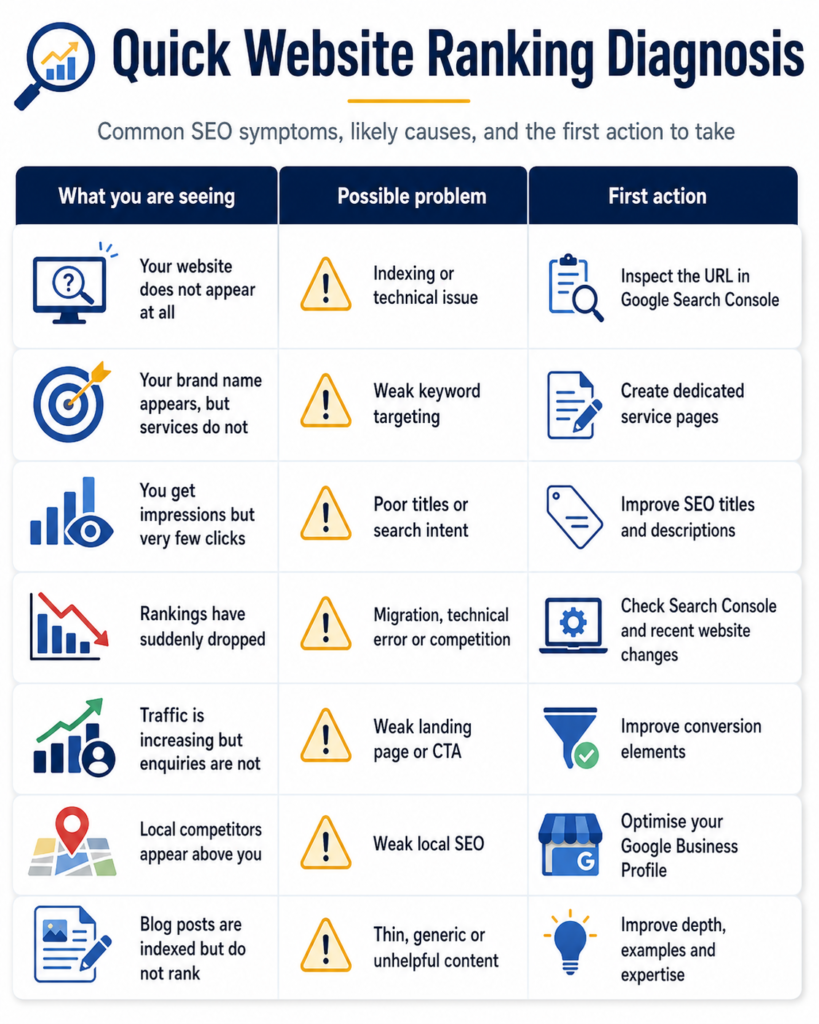
The correct solution depends on the problem. Publishing more articles will not fix a technical indexing issue, and buying backlinks will not fix a poorly targeted service page.
Start with diagnosis, not guesswork.
1. Google Has Not Indexed Your Website
Your website cannot rank if Google has not added it to its index.
A page can be live and available to visitors while still being missing from Google Search.
How to check whether your website is indexed
Search Google using:
site:yourdomain.co.uk
Replace “yourdomain.co.uk” with your real domain.
This search can give you a quick idea of which pages appear on Google. However, Google Search Console provides more accurate information.
Open Google Search Console and use the URL Inspection tool. Enter the exact URL you want to check.
The tool can show:
- Whether the page is indexed
- Whether Google can access it
- Which page Google selected as the canonical version
- Whether the page has a mobile usability issue
- Whether structured data was detected
- Why the page may not have been indexed
Google’s Page Indexing report provides a wider view of the URLs Google knows about, while URL Inspection is useful for checking one specific page.
How to fix it
Make sure the page:
- Returns a successful 200 status code
- Is not blocked by a noindex tag
- Is not blocked from crawling
- Is included in your XML sitemap
- Has at least one internal link from another page
- Contains useful and original content
- Is not a duplicate of another page
After fixing the issue, inspect the URL again and request indexing.
Do not repeatedly submit the same URL. Google states that sending multiple indexing requests for the same page will not make crawling happen faster.
2. Your Website Has a Noindex Setting
A noindex tag tells Google not to include a page in search results.
This setting is useful for private pages, test pages, account areas and internal search results. However, it can cause a serious SEO problem when it is accidentally added to important pages.
This often happens after:
- A website redesign
- Moving from a staging website
- Installing a new SEO plugin
- Changing WordPress visibility settings
- Importing a website template
- Migrating to a new domain
Google confirms that a page with a noindex rule will not appear in Google Search results.
How to fix it
For a WordPress website, go to:
Settings → Reading
Check that the option asking search engines not to index the website is not selected.
Next, open your SEO plugin and check the indexing settings for:
- Posts
- Pages
- Services
- Categories
- Author archives
- Individual pages
You should also inspect the page source or use Google Search Console to confirm that no unwanted noindex rule remains.
Removing the rule does not always bring the page back immediately. Google must crawl the page again before it can update the index.

3. You Are Targeting the Wrong Keywords
One of the biggest SEO mistakes is targeting keywords that are too broad, too competitive or unrelated to the customer’s real search intention.
For example, a small Manchester agency may try to rank for:
- SEO
- Web design
- Marketing
- Google Ads
- Digital agency
These keywords are extremely broad. They are also searched by people with very different intentions.
Someone searching for “SEO” may want a definition, a course, a job, free software or an agency. Google must decide which type of result best answers the search.
A smaller business usually has a better chance of ranking for more specific searches such as:
- SEO consultant in Manchester
- Small business SEO services UK
- WordPress SEO audit Manchester
- Local SEO company for dentists
- Affordable SEO services for UK startups
How to fix it
Choose keywords based on four factors:
Relevance: Does the keyword closely match your service?
Search intent: Is the user looking for information, a comparison or a service provider?
Competition: Can your current website realistically compete?
Commercial value: Could the search lead to an enquiry or sale?
Map one main topic to each important page. Do not try to make every page rank for the same keyword.
Your homepage can target your main business category, while separate pages should target individual services, industries and locations.

4. Your Content Does Not Match Search Intent
Search intent means the reason behind a Google search.
A user may want to:
- Learn something
- Compare different options
- Find a local company
- Buy a product
- Request a quote
- Solve an urgent problem
Google normally ranks the type of page that best matches this intention.
For example:
“What is local SEO?” usually needs an educational article.
“Local SEO consultant UK” usually needs a commercial service page.
“How much does local SEO cost?” usually needs a pricing guide.
“Best local SEO agencies in Manchester” usually needs a comparison page.
A service page may struggle to rank for an informational search. In the same way, a general blog post may struggle to rank for a keyword used by people who are ready to hire an agency.
How to fix it
Search your main keyword and study the first page of Google.
Look at:
- The type of pages ranking
- The topics they cover
- Their titles
- Their level of detail
- Whether results are local, informational or commercial
- Whether Google shows videos, maps, products or featured answers
Do not copy the ranking pages. Use them to understand what searchers expect.
Then create a page that answers the same intention more clearly, accurately and practically.
5. Your Content Is Too Generic
Many websites publish articles that say the same things as hundreds of other websites.
The content may be grammatically correct but still offer no strong reason to rank.
Common signs of generic content include:
- Long introductions that do not answer the question
- Repeated advice without examples
- No original experience
- No data or evidence
- No clear steps
- No expert opinion
- No UK-specific information
- No explanation of common mistakes
- Content written only to reach a word count
Google’s current guidance encourages website owners to create unique, reliable and people-first content that offers value beyond common information already available online.
How to fix it
Add useful elements such as:
- Real business examples
- Screenshots from relevant tools
- Step-by-step instructions
- Checklists
- Comparison tables
- Original observations
- Industry-specific advice
- UK pricing or market context
- Common mistakes
- Before-and-after examples
- Clear answers near the top of the page
Ask a simple question:
What will a reader learn from this page that they cannot easily find in the first five competing articles?
That difference may come from better experience, clearer explanations, stronger examples or a more focused audience.

6. Your Service Pages Are Too Weak
Many small business websites depend heavily on the homepage.
The homepage may list five or ten services, but each service receives only a few sentences.
This makes it difficult for Google to understand:
- What each service includes
- Who the service is for
- Which problems it solves
- Where the business operates
- Why the company is qualified
- Which search terms are relevant
How to fix it
Create a separate, detailed page for every important service.
For example:
- SEO services
- Local SEO
- Technical SEO audits
- Ecommerce SEO
- Google Ads management
- Social media marketing
- Web design
- WordPress development
A good service page should include:
- A clear H1 heading
- A direct explanation of the service
- The customer problems it solves
- Key benefits
- Your process
- Deliverables
- Relevant industries
- Proof of experience
- Frequently asked questions
- A strong call to action
Keep the content focused. Avoid creating several nearly identical pages by changing only the city name.
For businesses that need professional organic growth support, Rugmaz provides dedicated SEO services focused on visibility, traffic and conversions.
7. Your On-Page SEO Is Incomplete
On-page SEO helps search engines and visitors understand the purpose of a page.
A useful page can still underperform when its title, headings, URL and internal structure are unclear.
Check these on-page elements
SEO title
The title should explain what the page offers and include the main topic naturally.
Weak title:
Welcome to Our Website
Better title:
Local SEO Services for Small Businesses in Manchester
Meta description
The meta description should encourage the right person to click. It should clearly explain the page rather than simply repeat keywords.
H1 heading
Each important page should have one clear main heading that describes its subject.
Subheadings
Use H2 and H3 headings to organise the content into useful sections.
URL
Keep the URL short and readable.
Better:
/local-seo-services/
Weaker:
/page-id-472-service-new-final/
Image alt text
Describe useful images accurately. Do not force keywords into every image description.
Main keyword
Use the main topic naturally in the title, introduction, headings and body where appropriate. Do not repeat it unnaturally.
On-page SEO should improve clarity. It should never make the page difficult to read.
8. Your Internal Linking Is Weak
Internal links connect one page of your website to another.
They help visitors find related information and help Google discover and understand your pages.
Google recommends that every important page should receive a link from at least one other page on the website. Clear anchor text can also help people and Google understand the destination page.
Common internal-linking problems
- Important service pages have no links
- New articles are not linked from older posts
- Every link says “click here”
- Blog posts do not link to relevant services
- Several pages compete for the same keyword
- Old broken links remain on the website
- The website has orphan pages
An orphan page is a page with no internal links pointing to it.
How to fix it
When publishing a new article:
- Link it to one or two relevant service pages.
- Link it to related blog posts.
- Update older articles with a link to the new post.
- Use descriptive anchor text.
- Avoid adding unnecessary links to every paragraph.
For example, an article about website ranking problems can naturally link to:
- SEO services
- SEO pricing
- Technical SEO audits
- Web development
- Hiring an SEO consultant
Businesses that are unsure whether they need outside support can also read Rugmaz’s guide on when to hire an SEO consultant.
9. Your Website Has Little Authority
A new or unknown website may struggle to compete with established brands.
Google uses many signals to understand relevance and trust. Links from other useful websites can help search engines discover pages and understand their importance.
However, not every backlink is valuable.
A link from a respected industry website, local organisation, supplier or publication is usually more meaningful than hundreds of links from unrelated directories.
How to build authority
Focus on activities such as:
- Publishing original research
- Creating useful industry guides
- Contributing expert comments
- Building relationships with local organisations
- Joining relevant professional directories
- Earning media coverage
- Publishing case studies
- Creating useful tools or templates
- Working with trusted partners
- Fixing unlinked brand mentions
Avoid buying large packages of low-quality backlinks.
A sudden number of irrelevant links with unnatural anchor text can create risk rather than sustainable growth.
Authority normally develops through useful content, real relationships and consistent brand activity.
10. Your Local SEO Is Not Properly Set Up
Local SEO is essential for businesses serving a particular town, city or region.
Examples include:
- Solicitors
- Dentists
- Restaurants
- Builders
- Accountants
- Marketing agencies
- Plumbers
- Clinics
- Beauty salons
- Property services
Your website may rank poorly in local searches when your location information is incomplete or inconsistent.
How to improve local visibility
Optimise your Google Business Profile with:
- Correct business name
- Accurate address or service area
- Local telephone number
- Correct primary category
- Relevant secondary categories
- Current opening hours
- Complete service information
- Business description
- Real photographs
- Customer reviews
- Helpful responses to reviews
Google states that complete and accurate Business Profile information can help a company appear for relevant local searches. Google also recommends keeping hours updated, verifying the business and responding to reviews.
Your website should also include:
- Clear contact details
- A dedicated contact page
- Location information
- Local service content
- Consistent business information
- Relevant local references
- LocalBusiness structured data where appropriate
Do not create dozens of weak location pages containing almost identical text. Each location page should provide useful and genuine information.
11. Your Website Is Slow or Difficult to Use on Mobile
A website may look attractive on a large computer screen but perform poorly on a mobile phone.
Possible problems include:
- Text that is too small
- Buttons that are difficult to tap
- Large images
- Slow loading
- Popups covering the screen
- Broken menus
- Moving page elements
- Forms that are difficult to complete
- Content missing from the mobile version
Google uses the mobile version of a website’s content for indexing and ranking.
Google’s Core Web Vitals also measure important parts of real-world user experience, including loading performance, responsiveness and visual stability. However, a perfect performance score alone does not guarantee top rankings.
How to improve website performance
- Compress large images
- Use modern image formats
- Remove unnecessary plugins
- Improve hosting quality
- Reduce unused scripts
- Use caching
- Avoid excessive animations
- Test forms on mobile devices
- Make buttons easy to tap
- Remove intrusive popups
- Keep the main content easy to find
The goal is not only to satisfy an SEO tool. The website should feel fast, simple and trustworthy to real visitors.
12. Duplicate Content Is Confusing Google
Duplicate content can appear when the same or very similar information is available through several URLs.
Examples include:
- HTTP and HTTPS versions
- WWW and non-WWW versions
- Printer-friendly pages
- Product filters
- Tag archives
- Tracking parameters
- Similar service pages
- Copied manufacturer descriptions
- Several location pages with the same text
Google may select one version as the canonical page. However, technical problems can cause Google to select a different URL from the one you prefer.
How to fix it
Use:
- 301 redirects for permanently moved pages
- Canonical tags for duplicate or similar versions
- Consistent internal links
- Clean sitemap URLs
- One preferred domain version
- Original product and service descriptions
Google describes redirects and canonical tags as strong signals for identifying the preferred version of a page. Sitemap inclusion is a weaker canonical signal.
Do not add canonical tags without understanding them. A wrong canonical can tell Google to ignore an important page.
13. A Website Migration Damaged Your Rankings
Ranking drops often happen after:
- Changing the domain name
- Redesigning the website
- Changing the CMS
- Changing URL structures
- Moving from HTTP to HTTPS
- Replacing old service pages
- Changing hosting
- Removing old content
The problem is usually not the redesign itself. It is how the migration was managed.
Common migration mistakes
- Old URLs were deleted
- No 301 redirects were added
- Redirects lead to unrelated pages
- Internal links still use old URLs
- Important content was removed
- Metadata was lost
- The sitemap was not updated
- The staging website remained indexed
- The live website had a noindex rule
- Tracking codes were removed
Google provides specific guidance for website moves because URL changes can affect how pages are crawled, indexed and displayed in search results.
How to fix it
Create a list of all valuable old URLs and match each one with the most relevant new URL.
Then:
- Add permanent 301 redirects
- Update internal links
- Remove redirect chains
- Fix broken links
- Submit the new sitemap
- Check canonical tags
- Inspect important URLs
- Monitor clicks and impressions
- Restore valuable missing content
Do not redirect every deleted page to the homepage. Use the closest relevant replacement.
14. Your Website Is New
A new website usually has:
- Few backlinks
- Limited content
- Little search history
- Low brand awareness
- Few mentions
- Limited trust signals
This does not mean the website cannot rank. It means the strategy must be realistic.
Trying to rank immediately for highly competitive national keywords may not be the best starting point.
What a new website should do
Start with:
- Specific long-tail keywords
- Local searches
- Detailed service pages
- Useful problem-solving articles
- Clear internal linking
- Accurate business information
- Strong About and Contact pages
- Real case studies
- Consistent publishing
- Genuine industry links
A new website may first gain impressions for small and specific searches. Over time, stronger content and authority can help it compete for larger keywords.
SEO should be measured through progress, not only first-position rankings.
Track:
- Indexed pages
- Search impressions
- Clicks
- Keyword growth
- Qualified enquiries
- Calls
- Form submissions
- Revenue from organic traffic
15. You Are Doing SEO Tasks Without an SEO Strategy
SEO activity and SEO strategy are not the same thing.
A business may publish four articles per month, add keywords and purchase backlinks but still see little growth.
This usually happens when the activities are not connected to a clear plan.
Signs that you do not have an SEO strategy
- Blog topics are chosen randomly
- Several pages target the same keyword
- Important services have no dedicated pages
- No competitor research is completed
- Technical issues remain unfixed
- No conversion tracking is installed
- Traffic is measured without enquiries
- Content is published but never updated
- Local SEO is ignored
- Links are built to the wrong pages
How to build a practical strategy
A useful SEO strategy should connect:
- Business goals
- Customer pain points
- Keyword research
- Search intent
- Website structure
- Content planning
- Technical SEO
- Authority building
- Conversion optimisation
- Performance measurement
Every article should have a purpose.
It may:
- Attract potential customers
- Answer an important question
- Support a service page
- Build topical authority
- Earn links
- Address an objection
- Help users compare solutions
Do not publish content simply because a keyword has search volume.

A Simple 30-Day SEO Recovery Plan
Trying to fix everything at once can become overwhelming. Use this four-week plan to focus on the most important issues first.
Week 1: Check Technical and Indexing Problems
- Set up Google Search Console
- Inspect your homepage and main service pages
- Check the Page Indexing report
- Look for noindex rules
- Review your XML sitemap
- Fix broken pages
- Check canonical tags
- Test the website on mobile
- Review recent website changes
Week 2: Review Keywords and Search Intent
- List your main services
- Choose one main keyword theme for each page
- Check what currently ranks
- Separate informational and commercial keywords
- Identify keyword overlap
- Find missing service pages
- Find useful long-tail questions
Week 3: Improve Important Pages
Start with pages that can generate enquiries.
Improve:
- Titles
- Main headings
- Introductions
- Service explanations
- Benefits
- Examples
- FAQs
- Internal links
- Calls to action
- Contact options
Do not spend the entire week updating low-value blog posts while your main service pages remain weak.
Week 4: Build Local Relevance and Authority
- Complete your Google Business Profile
- Ask genuine customers for reviews
- Respond to existing reviews
- Update business directories
- Contact relevant partners
- Publish one strong expert article
- Add internal links from older content
- Create a simple link-building plan
At the end of the month, compare performance with the previous period.
How Long Does It Take to Improve Google Rankings?
There is no fixed timeline that applies to every website.
The time required depends on:
- Website age
- Competition
- Technical condition
- Content quality
- Current authority
- Location
- Industry
- Keyword difficulty
- Available resources
- Speed of implementation
A technical indexing problem may be corrected relatively quickly, but competitive rankings usually require longer-term work.
Be careful with anyone promising:
- Guaranteed first position
- Instant rankings
- A fixed number of backlinks
- Thousands of visitors within days
- Secret access to Google
- Paid priority indexing
Google does not accept payment to crawl a website more often or rank it higher.
A professional SEO plan should provide clear work, honest reporting and realistic expectations.
Businesses planning their investment can read Rugmaz’s practical guide to SEO costs in the UK.
When Should You Hire an SEO Consultant?
Some SEO improvements can be completed internally. However, professional support may be useful when:
- Your website is not being indexed
- Rankings dropped after a migration
- You have received a manual action
- Several pages compete with each other
- Organic traffic is falling
- Your development team needs technical guidance
- You operate in a competitive industry
- You need a long-term content strategy
- You cannot connect traffic with leads or revenue
- Previous SEO work produced no clear result
Before hiring someone, ask:
- What problems have you identified?
- Which pages should be prioritised?
- How will success be measured?
- What work will be completed each month?
- Will we receive access to all accounts?
- Are the links built manually and relevant?
- How will SEO support business enquiries?
A good consultant should explain the plan in clear language rather than hiding behind complicated reports.
Final Thoughts
A website normally fails to rank because of several connected problems rather than one single issue.
The problem may involve:
- Indexing
- Keywords
- Search intent
- Content quality
- Service pages
- Internal links
- Website authority
- Local SEO
- Mobile experience
- Duplicate pages
- Migration errors
- Lack of strategy
Start with your most important pages and diagnose the real issue before spending money on more content or backlinks.
Fix technical barriers first. Then improve keyword targeting, content usefulness, website structure and authority.
SEO takes consistent work, but it becomes much easier when every action is linked to a clear business goal.
Rugmaz helps UK businesses improve organic visibility through technical SEO, content planning, on-page optimisation and practical growth strategies. Rather than focusing only on rankings, the goal is to attract the right visitors and turn search visibility into genuine business opportunities.
Frequently Asked Questions
Why is my website indexed but not ranking?
Indexing only means Google has stored information about the page. It does not mean the page is considered one of the best results for your target keyword.
The page may have weak content, poor search-intent alignment, limited authority, strong competition or unclear keyword targeting.
Why does my homepage rank but my service pages do not?
Your service pages may be too short, poorly linked or targeting the same keywords as the homepage.
Create detailed service pages and connect them through clear internal links.
Can I rank without backlinks?
It may be possible to rank for low-competition or very specific searches without many backlinks. More competitive searches normally require stronger authority, useful content and wider brand signals.
Focus on earning relevant links rather than reaching a particular backlink number.
Does publishing more blog posts improve rankings?
Only when the posts are useful, relevant and connected to your business strategy.
Publishing many weak articles can waste resources. A smaller number of strong articles is usually more valuable than a large collection of generic posts.
Should I use AI to write SEO content?
AI can help with research, planning and editing, but the final content should provide real value.
Add expert knowledge, original examples, accurate information and clear human review. Do not publish unverified or generic text simply to produce content faster.
How often should I update my website content?
Update content when information becomes outdated, search intent changes, services change or the page is no longer performing well.
Do not change successful pages without a clear reason.
Can paid Google Ads improve organic rankings?
Google Ads and organic SEO are separate systems. Paying for advertisements does not directly purchase higher organic rankings.
However, PPC data can help identify useful keywords, customer messages and high-converting landing pages.